
Overview#
Project Burbank allowed the player to take the role of the Director in the campaign they played out during the game. Burbank uniquely allowed players to customize not just their Main Character and the narrative they were directing, but allowed them to edit a cast of characters’ memories and backstories, change the genre of the story, and more systemic characteristics. I was responsible for the Pre- and Post-Game systems, ensured that they created an experience as engaging as the core gameplay, and they became integral parts of the gameplay loop as a result.
These systems were instrumental in establishing the core experience for the player and also ensured the game remained compelling for those who did not want to direct the entire experience. Both Pre- and Post-Game flows consisted of a series of stages containing a mix of UI and game camera that the player progressed through to set up and view the results of their campaign. These systems were built in C++ with Blueprint and required heavy use of MVVM, State Tree, TFutures and TPromises, and more.
In-Game Representation#
Pre-Game#
The Pre-Game flow was responsible for guiding the player through character and campaign customziations, and had Stages like Character Customization, Cast Customization, Campaign and Story Setup. It was essential that Pre-Game not only introduced players to all the system-defining customization options, but was also a creative outlet and fun in its own right.
Some examples of Pre-Game Stages: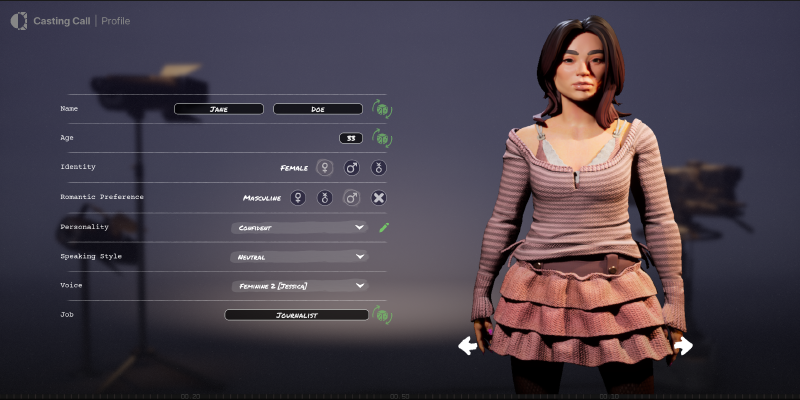
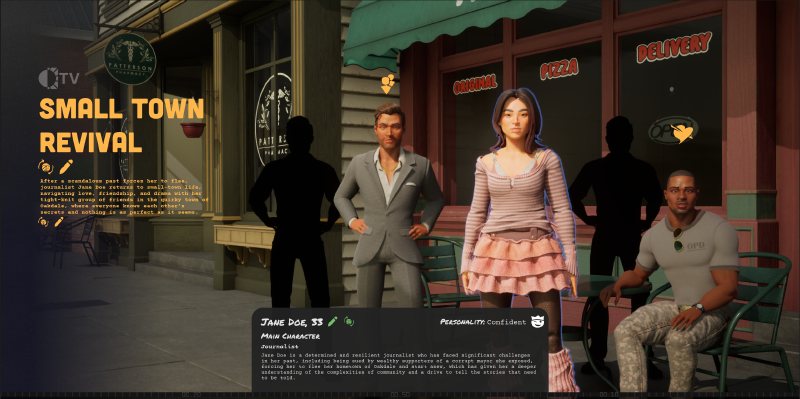
Post-Game#
There are many unique and interesting ways to display game stats at the end of a campaign, which made designing this system even more fun. The Post-Game flow consisted of Studio Notes (our recap screen), Level Up, and the Next Scene Chooser. Because each playthrough was so interactive and unique to itself, it was important that we encapsulated the nuances of each playthrough in this flow.
Some examples of Post-Game Stages: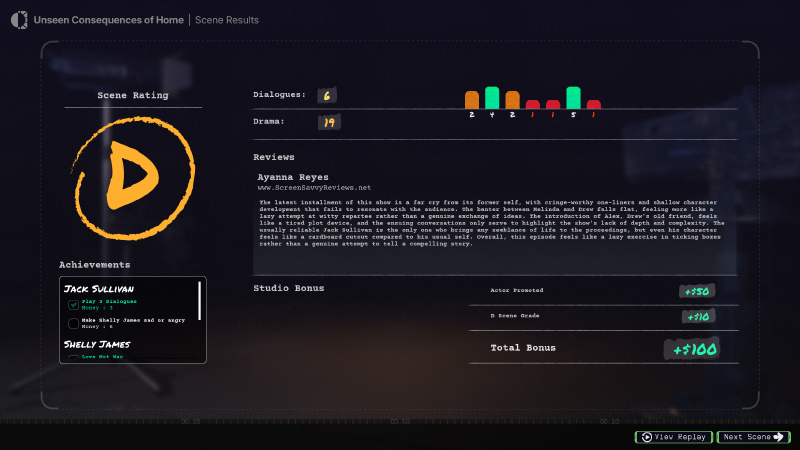
System Architecture#
Each Stage of the Pre- and Post-Game flows were treated as individual entities, though they existed in the same world and were pre-loaded to avoid any additional buffer. A State Tree managed the entirety of the flow due to its modular nature, and each player-facing step was treated as a State. Each State followed the same general pattern: A custom C++ Manager Actor was spawned as it entered the State and gets assigned the associated UI’s View Model.
The Manager Actor and View Model manage the all of the gameplay logic and update the widget via bindings. The majority of the logic is kept in C++ to avoid checking out Assets in Perforce to maintain design and iteration speed.
Modular State Tree-Based Design#
Each player-facing screen was treated as its own individual State, and each State was able to have unique children States that allowed us to further customize the internal functionality of each Stage. This was exceptionally important due to the asynchronous nature of the systems in a few Stages.
Pre-Game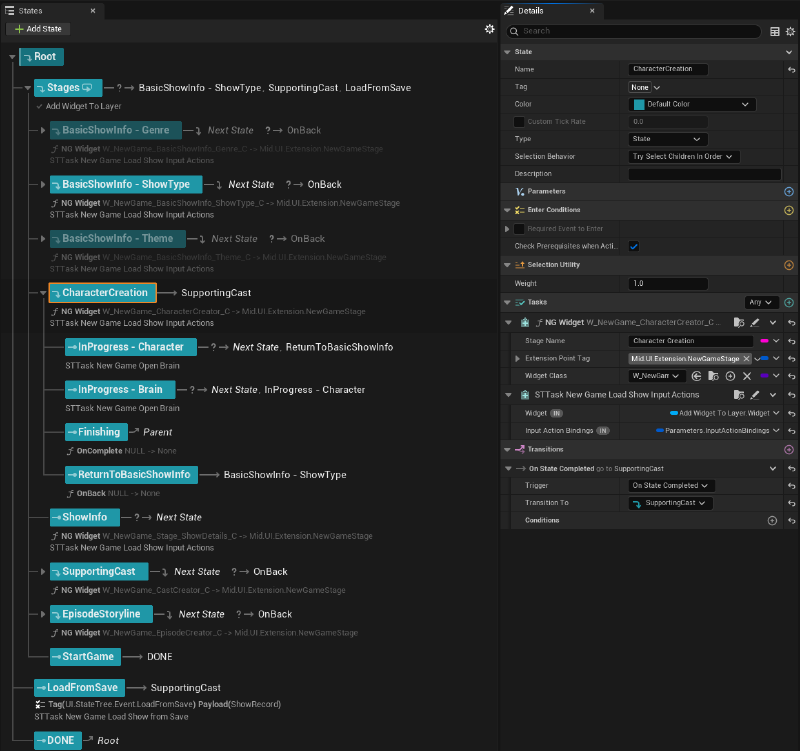
Post-Game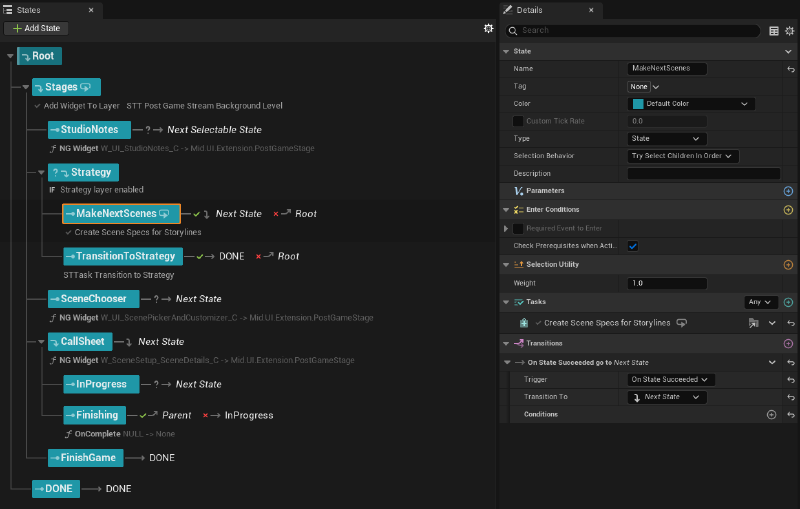
In Stages where the player is not able to progress until internal asynchronous background logic is processed, I utilized ‘In Progress’ child stages to stop progression until the Manager Actor broadcasts a delegate to flag that all asynchronous processes have fully finished and it is safe to transition. This modular design also makes it easy to swap out or add in screens without editing any ‘Back’ or ‘Next’ functionality by hand.
MVVM Patterns#
To manage the UI widgets per stage and the game state itself, I utilized MVVM to connect player-inputted data to internal gameplay systems to dynamically generate new narrative campaigns and to collect and record campaign state data in these two systems.
Below is an example of the View Model on the Character Creator Stage: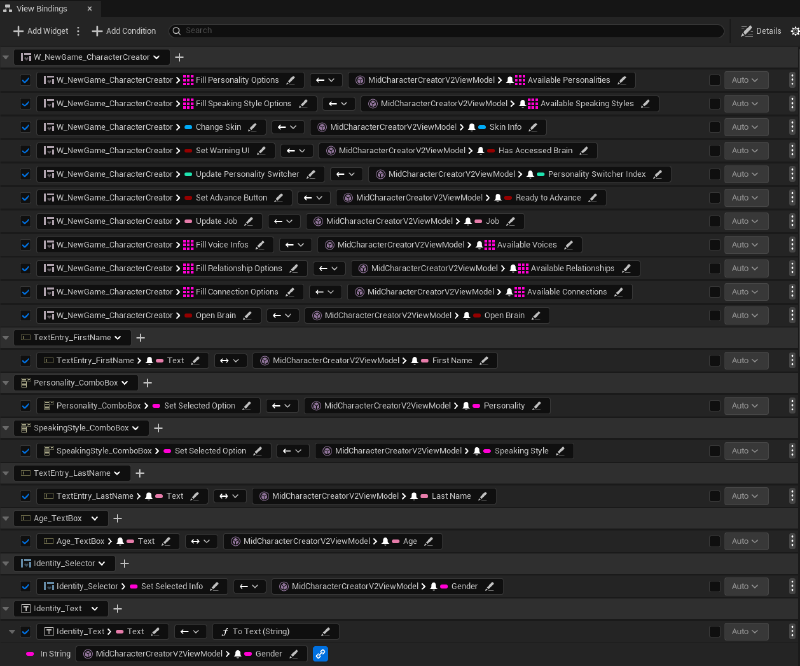
Since the View Model references the Manager Actor and vice versa, making changes or running logic for the UI from C++ becomes very simple. View Models are heavily used on all Stages during these flows, and handled a variety of tasks from updating UI, processing player-inputted data, and customizing each individual playthrough. The base Manager Actor and View Model classes set this functionality up by default for ease of creating new Stages in the future.
TFutures and TPromises#
Asynchronous coding was heavily used during these flows because Stages were dependent on the information gained from the Stage prior - however not all necessary data was instantly transmitted or readable. This created a lot of complexity as I was designing the system and was the forcing function behind a few systemic decisions that were made.
It was especially common to require multiple Actors or specs that were created asynchronously during this process. Below I’ve attached a pseudocode snippet of a pattern I employed heavily to manage this requirement:
TSharedPtr<TPromise<TArray<ACharacterActor*>>> Promise = MakeShared<TPromise<TArray<ACharacterActor*>>>();
TWeakObjectPtr<ACharacterActor> WeakSelf(this);

CreateCharacterAsync().Next([WeakSelf, Promise](const TArray<FNewCharacterSpec>& CharacterSpecs)) --> void
{
   if (!WeakSelf.IsValid())
	{
		Promise->EmplaceValue(TArray<ACharacterActor*>());
		return;
	}

   TArray<TFuture<ACharacterActor*>> Futures;
	for (FInstancedStruct Spec : CharacterSpecs)
	{
		...
		Futures.Add(CreateCharacterFromSpec(*Spec));
	}

	WhenAll(MoveTemp(Futures)).Next([Promise](const TArray<ACharacterActor*>& Results)
	{
		Promise->EmplaceValue(Results);
	});
});

return Promise->GetFuture();
Where:
TFuture<ACharacterActor*> CreateCharacterFromSpec(const FInstancedStruct& CharacterSpec);This snippet is one instance of a broader pattern that I used throughout the system. Rather than letting async work leak into gameplay-facing systems, I chained async steps together and wrapped the result in a single return value, keeping other dependent and higher-level systems clean and latent. This made the base code easier to iterate on, safer under lifecycle or loading changes, and much easier to debug as the system grew.
Reflection#
These systems are foundational to how players understand, build, and reviewed their campaigns, meaning it was essential they were as fun and reliable as the core game itself. Building them reinforced the importance of structure and pacing for these supporting experiences, and evolved my approach to designing these UI-driven systems:
- State-driven architecture allowed each screen to exist as an independent stage, making it easy to add, remove, or reoder Stages as needed without rewriting UI navigation logic, introducing dependencies, and more.
- Pairing Manager Actors with ViewModels created a clear separation of gameplay logic and UI presentation, keeping it easy to debug and author as well as giving space to designers and UI artists.
- Having each screen as a self-contained system with shared base behavior made it easy to iterate upon each individual Stage without impacting downstream screens.
- Encapsulating asynchronous code with TFutures and TPromises prevents timing complexities from leaking into gameplay-facing code, which minimizes the risk of race conditions and improves code maintainability - an important quality during rapid iteration.